Changelog
Latest updates and improvements to the platform
Latest Updates
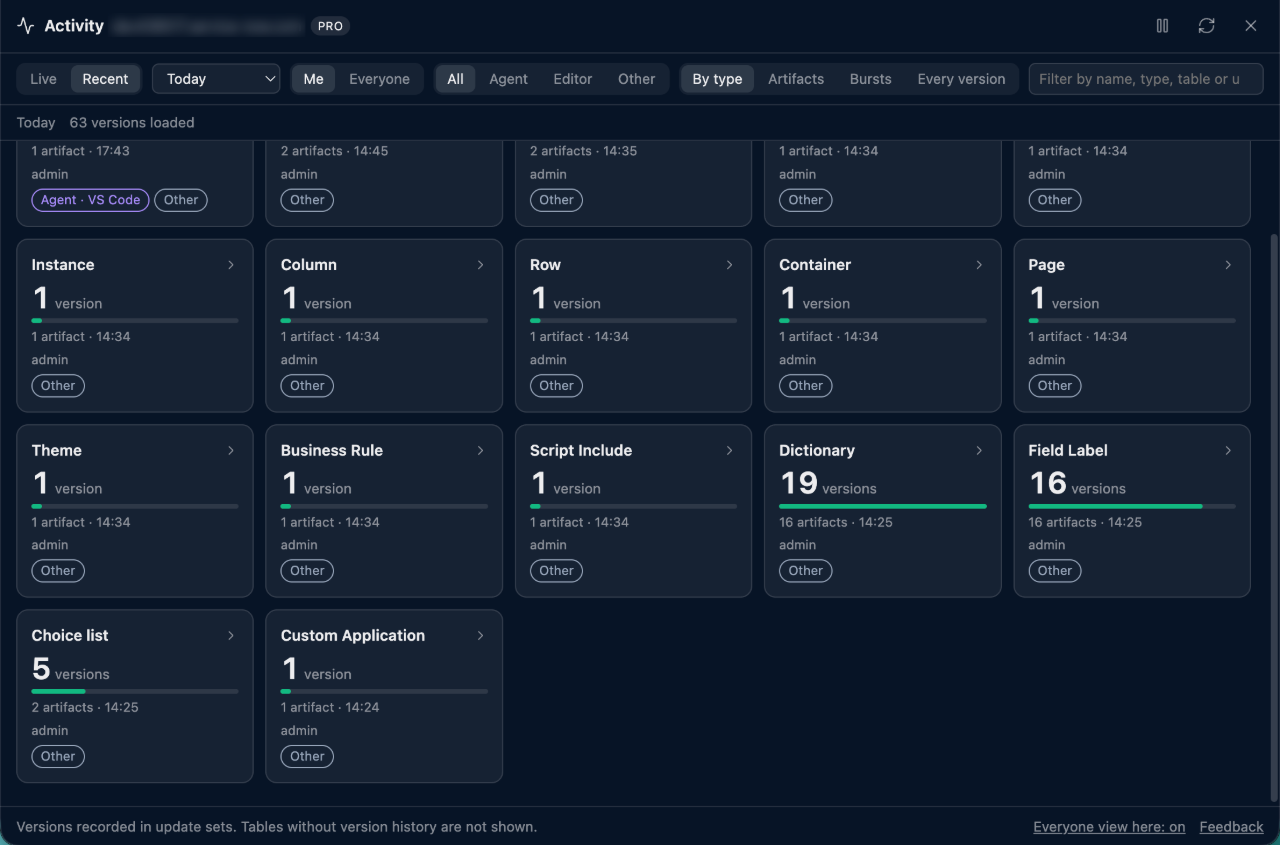
- New: see what changed on your instance, who changed it and through what, with the Activity Feed (Pro):
/activityshows every saved version of your scripts, rules and other artifacts as tiles per type, by artifact or by burst of work, with an Agent or Editor badge on changes made through ScriptSync, and compares any change with the version before it. Open it from the Update Set Manager, or use Watch live in the ScriptSync helper to follow an AI agent's changes as they happen. - Choose encryption before pasting attachments: enable the option in
/attSettings for an instance to choose None, keep the instance default, or cancel before each paste uploads. One choice covers a batch of files. The option is off by default and saved in this browser. - Custom commands have the same label in the slash palette and Settings: your own commands now show Custom in both places.
- Custom slash command scripts keep their formatting after saving: reopening a Script command shows it with your line breaks and comments instead of one compressed line, while the instance still runs the compact version. Pro syncs the formatted script to your other browsers. Commands saved before this update stay compressed until you save them again.
- Dot-walk into child tables from the Personalize Columns field browser (Pro): after following a reference to a parent table such as Task, click the last row to load the tables that extend it, so Request > Parent > Global Case > Consumer adds
request.parent.ref_.consumer. - Ctrl+1 to Ctrl+4 switch Firefox tabs again: SN Utils no longer claims these keys by default, so Ctrl+2 stops reopening the page in
nav_to.do. Activate, Pop In / Pop Out, Technical Names and /shortcut can still get a key in your browser's extension shortcut settings. - Code search from the standalone
snuCLI and MCP server works with the helper tab: searches fromsnu0.3.10 no longer fail with "Search term must be at least 2 characters". - AI Builder and Sidekick are more dependable with Claude and GPT (Pro): pick Claude Sonnet 5.5 or Haiku 5.5, Claude and GPT answers no longer stall on "Generating", long scripts get three minutes instead of one, and a declined request gets a short note to rephrase it instead of a blank answer.
run slash commands automatically when a page opens — build your own with instance, table, record, URL, time-window and "element appears" conditions, or show a custom reminder banner (Pro). Community includes the one-click built-in that auto-runs the new /expand command.
open the inline Snapshot from the table-name popover on a CMDB or CSDM form (Public Beta, planned Pro) to see a record's entity, domain, stage and visible evidence; run /csdm on a form for the Pro record Lens with deeper field and relationship checks, or anywhere else for the Pro Overview with an interactive domain map, live table counts and deep links.
open it from the breadcrumb, the new list-header button or the table-name popover — it keeps your active ORDERBY and GROUPBY, formats long queries one clause per line, validates or resets edits, and applies with CTRL/CMD+Enter. Pro adds live counts, script generation from your own list-query snippet template, a REST URL, reusable slash commands and Related Data.
/copycolumnsa toggle next to the personalize-list gear pauses ServiceNow's inline edit so you can grab cell values. Pick individual cells or whole columns and copy them as a grid in TSV / CSV / Pipe / Markdown, with an optional header row, a trailing sys_id column and clickable links. Community gets single-cell copy and drag-select.
honours your Code Search Groups and custom table/field overrides out of the box, a two-pane results layout with per-record field-type badges and collapsible long blobs, one-click JSON export, and AI agents in VS Code / Cursor can run the same search through Script Sync.
per-field-type icons with type-aware copy/query actions on every field, a table-name pill context menu, Show Table Fields with inline values and in-place editing (admin + Pro), plus inline table-hierarchy and translations previews.
AI chat renders markdown and survives page navigation, you can ask straight from the slash palette (/skai), and slow or failed answers show live progress with Retry / Continue. /sklog gains log-level filters, time ranges and correct same-second ordering.
a themed, resizable multi-format viewer (images, Monaco-highlighted code, JSON, CSV, PDF, Office, audio/video, email) that works in both Classic UI and Workspace via /att, with Pro drag-&-drop upload, bulk zip/delete and duplicate detection.
v10.0.0.0
Version 10 introduces SN Utils Pro and a redesigned day-to-day workflow centered around the new Manage page. The focus of this release is better usability, faster navigation, and deeper insight into your ServiceNow instances.
Beyond the highlights listed here, version 10 includes extensive changes under the hood — improved extension-to-page communication, modernized internal architecture, better error handling, and cross-browser hardening. This changelog covers user-facing features only.
Important Changes
- Custom slash commands are now a Pro feature. Users who already have custom slash commands can continue using and editing them (as raw JSON). Going forward, creating new custom slash commands requires a Pro or Enterprise license.
chrome.storage.syncis no longer used. All extension data is now stored inchrome.storage.localonly. Legacy sync data is migrated automatically on first run.
Major Features
- New Manage page as the central hub for settings, commands, snippets, switches, shortcuts, packs, and account context
- New Sidekick (Pro) — a floating utility panel (using Document Picture-in-Picture or a popup fallback) with six built-in tools:
- Log Viewer — stream system logs in real time while you work
- Session Inspector — see your user, roles, groups, update set, and impersonation context at a glance
- URL Doctor — view and edit the current page's URL parameters without touching the address bar
- Form Analyzer — inspect form structure, fields, related lists, and server-side policies
- Client State — explore live Next Experience client-side state for
/now/pages - Sidekick AI — AI assistant with ServiceNow context awareness
- New GraphQL Code Search (Pro) — search script and text fields across 450+ ServiceNow tables using batched GraphQL queries, with field-level matching, word-token AND logic, a curated table index, and IndexedDB caching
- New AI Command Builder (Pro) — create and refine slash commands and snippets with streaming AI suggestions
- New Mouse Actions (Pro) — configurable middle-click quick action and Quick Ring — a long-press radial menu with up to 8 configurable slash command slots for one-gesture access to your most-used commands
- New Snippets (Pro) — double-tap Shift to search and insert snippets at the cursor, with cloud sync, pack and team snippet merging, a built-in demo set, and Monaco autocomplete for snippet variables
- New Keyboard Shortcuts (Pro) — assign any modifier+key combination to trigger a slash command directly, plus a separate custom shortcut to open the slash command popup as an alternative to the browser extension shortcut
- 14-Day Pro Trial — free trial of in-browser Pro features (Sidekick tools, mouse actions, GraphQL Code Search, and more). No account or credit card required.
Slash Commands
- Dynamic time switches: use
-u5d,-c3h,-uc15m,-um1wand similar patterns to filter by updated/created time ranges without defining fixed switches - Smarter search with scored ranking: exact match, then starts-with, then contains
- Source badges (Pack / Team / Personal / Legacy) on command hints so you know where each command comes from
- Inline results arrow now works on any command whose URL contains a query — press the arrow to preview results without leaving the palette
- Rewrote
/rnd(Fill Random Fields) from scratch: supports 15+ field types including references, choices, dates, booleans, integers, decimals, emails, URLs, and currency — handles dependent fields in multi-pass order with auto-retry and XSS test mode - Context-aware
/listthat works on reports, Performance Analytics dashboards, and Knowledge pages - Sys_id instance search — paste a sys_id and SN Utils searches across all tables using GraphQL batches with REST fallback to find the record
Background Script
- Improved Background Script panel with impact summary visuals showing affected records, tables, and execution time
Sync, Backup, and Packs (Pro)
- Unified Cloud Backup and Sync experience in the Manage page
- Incremental sync engine that only downloads changed data
- Automatic daily cloud backup with device-level merge on new installs
- Background sync aligned with the 6-hour license heartbeat
- Detailed sync toasts showing what changed, with a persistent Sync Log for debugging
- Improved Pack Marketplace with lazy-loaded previews, a Worknotes snippet pack, and better install behavior
Pro Features
- Privacy Mode for optional email masking in extension UI surfaces
- Copy Personalize List URL preserves the correct column order from the personalize modal
Fixes
- Cross-browser compatibility: when a browser side panel is unavailable (Safari, Firefox, Opera, Arc), SN Utils opens settings in a popup window or tab instead
- Fixed slash command popup overflowing the screen viewport on lower positions
- Fixed Monaco compare links preventing unwanted page navigation
- Fixed InstanceTag flicker when ServiceNow's framework re-attaches elements
- Fixed Monaco
Cmd+/andCtrl+/keeping native code-comment action instead of opening the slash popup
Documentation
- Launched comprehensive documentation site covering all features, guides, and getting-started workflows
- New dedicated guides for Sidekick tools, slash commands, snippets, keyboard shortcuts, code search, and more
- Introduced an AI-powered docs assistant to search and answer questions directly from the documentation
Version 10 also includes many more changes under the hood that are not listed here — improved extension-to-page communication, modernized internal architecture, better error handling, cross-browser hardening, and dozens of smaller refinements across the entire extension.
---
Previous Releases
View the full changelog on GitHub